
User Manual
SkinAI (MDR Compliance)
Manual version: 1.0.
- Medical Device – Class I (MDR 2017/745)
- CE-marked software medical device
- For informational purposes only – NOT a diagnostic tool
Please read, understand, and follow all safety information contained in these instructions prior to using the SkinAI App. Retain these instructions for future reference.
This document is a user manual for SkinAI App, a medical device software developed by Skinive LTD and registered in Malta.
- GENERAL INFORMATION
1.1 Intended Use
This mobile application integrates AI-based skin analysis technology powered by the Skinive API (https://skinive.com/). It is intended for use by adults aged 18 and above to support the monitoring, self-assessment, and documentation of visible skin conditions.
The underlying technology (Skinive) is a Class I medical device software (MDR EU 2017/745) designed to analyze images of human skin (typically ages 3–65+) taken via smartphone camera. The system identifies visual similarities between user-submitted skin images and reference conditions in a validated medical database.
The purpose of the app is to assist users in recognizing potential skin abnormalities and tracking changes over time. It is not a diagnostic tool, but a pre-screening solution that encourages timely consultation with qualified medical professionals.
For dermatological analysis of facial skin we use a certified tool from the company AiLabTools (www.ailabtools.com). The use of the tool occurs through API.
1.2 Important Notes on Use
WARNING: This app does NOT provide a medical diagnosis.
Recommendation: Consult a qualified healthcare professional before making any medical decisions.
WARNING: The app may produce false positives or false negatives due to variations in skin type, camera quality, and lighting conditions.
1.3 Contraindications
Do not use the SkinAI App if:
- The scanned area is damaged or recently injured (e.g., biopsy, excision) due to the potential risk of inaccurate image analysis.
- The lesion is located under nails, mucous membranes, or heavily pigmented skin, as these conditions may distort the visual analysis.
- The surrounding area contains foreign objects (e.g., tattoos, creams, hair) which may interfere with the AI’s image recognition accuracy.
- PRIVACY, SECURITY & REGULATORY COMPLIANCE
2.1 Compliance with MDR & GDPR
- MDR (EU) 2017/745, Class I Compliant
- GDPR (EU) 2016/679 Compliant – User data protection ensured
- The manufacturer is registered in EUDAMED under SRN: APP000069201.
2.2 Privacy and Data Protection
Your data is securely stored and encrypted
WARNING: Do not share your login details with third parties.
GDPR Compliance: The app complies with Articles 13–15 of GDPR, ensuring transparency, user rights, and data protection.
Data Storage: User data is stored for as long as the user actively uses the app. If there is no activity for 12 months, an email notification will be sent requesting confirmation to extend data storage. If the user does not confirm within 30 days, all data will be permanently deleted without the possibility of recovery. Users have full control over their data and can delete their account at any time by selecting the “Delete Account” option in the profile settings, which will immediately erase all associated data without the possibility of restoration.
Users have the right to access, delete, and export their data in accordance with Articles 13-15 of the GDPR.
Refer to the Privacy Policy at https://skinlycare.io/privacy-policy/ before using the app.
- DEVICE COMPATIBILITY & SYSTEM REQUIREMENTS
Compatible with:
iOS 15+
Minimum camera requirements:
10 MP resolution, ƒ/1.9 aperture
Optical stabilisation & autofocus support
Potential Compatibility Issues:
Older devices with outdated operating systems may experience performance issues.
For best performance, use a smartphone manufactured within the last five years.
The useful life of the application is determined by the software update cycle, with a minimum support period of two years from the date of installation.
- INSTRUCTIONS FOR USE
4.1 Installation and Setup
- Download and Install:
The SkinAI app can be downloaded from the Apple App Store.
Ensure your device meets the system requirements.
- Profile Setup (Fig. 1):
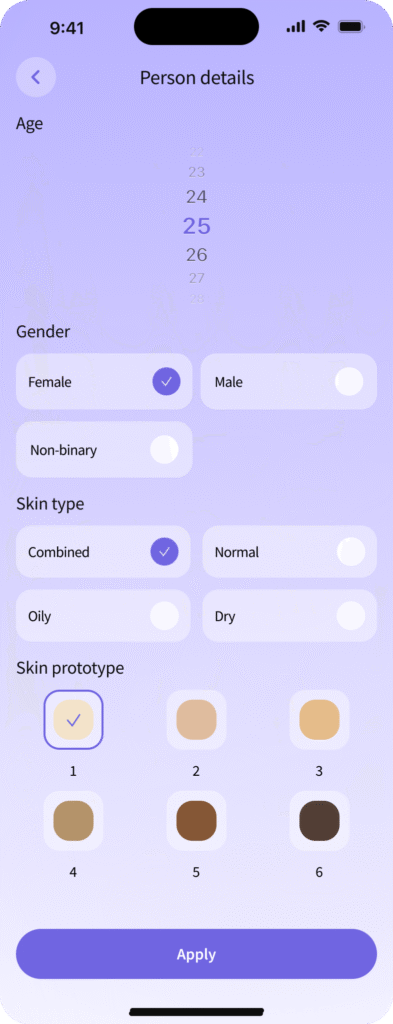
Fig.1
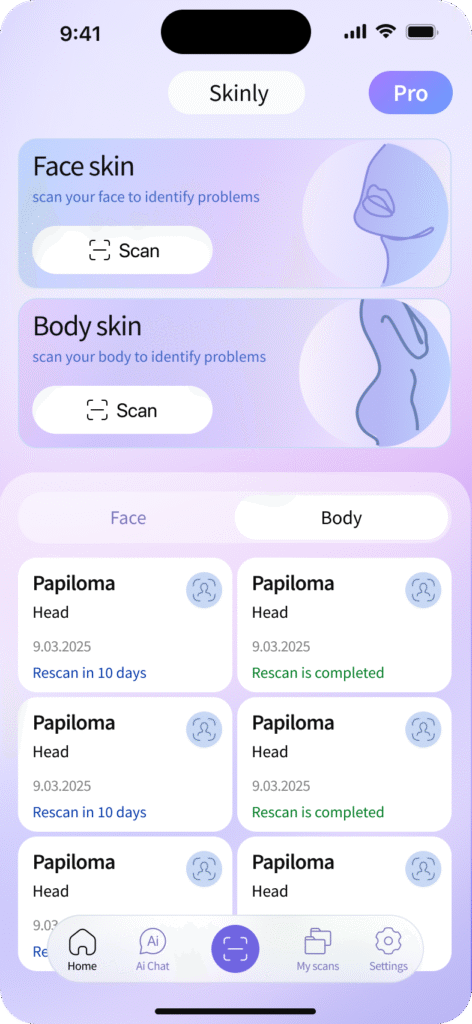
Fig.2
- Provide basic non-personal information (e.g., gender, age, skin type) to optimise AI-based analysis.
- No sensitive personal data is required.
After setting up your profile or logging into the SkinAI app, you will see the SkinAI home screen (Fig. 2). On this screen, you can view a list of your recent skin checks (in the center of the screen) and the App Menu (at the bottom of the screen).
4.2 Taking Skin Photographs and Evaluation
Recognised skin conditions: The AI algorithm can recognise different types of acne, mycoses, papulosquamous lesions, HPV, dermatitis, neoplasms (nevi).
To start a new skin scan: Click the «Scan» button in the Body skin section (at the top of the screen). Review the scanning guidelines provided in the pop-up window.
In the next window, a schematic image of a person (2D model) will appear (Fig. 3). You need to: Click on the corresponding part of the body where the skin lesion you want to photograph is located. To continue the test, you can take a new photo of the skin area with your smartphone Camera, or you can choose a ready-made photo from your Photo gallery (Fig. 4).
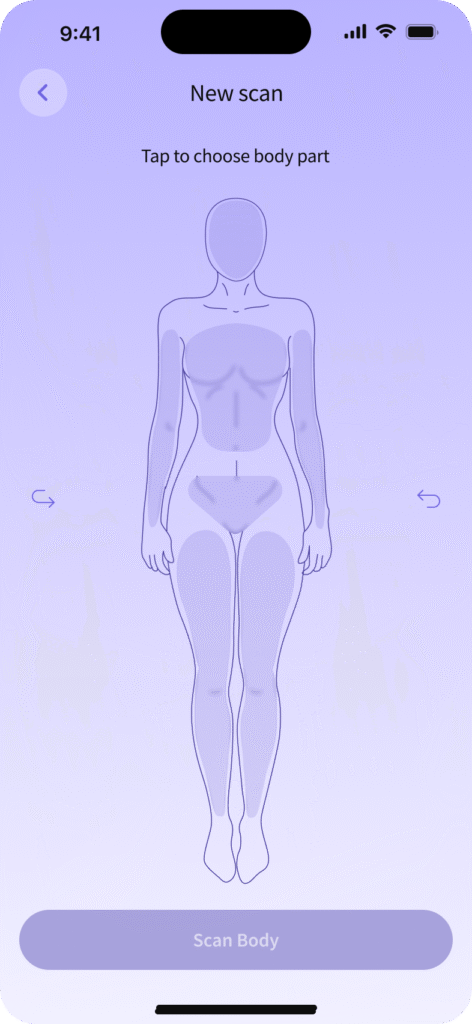
Fig.3
To continue the test, you can take a new photo of the skin area with your smartphone Camera, or you can choose a ready-made photo from your Photo gallery (Fig. 4).
In the Camera mode (Fig. 4,) you can find the skin area of interest and take a picture of it. Point the centre of the camera at the skin lesion and make sure that in the area around the formation, there is not too much hair, shadow or other foreign objects. Centre the skin formation in the centre of the camera viewfinder, stabilise your smartphone and take a photo. To do this, you need to click on the «Shoot» icon.
In camera mode, tools such as zoom and flash are available to enhance photo quality.
Important for nail photos:
When photographing nails, please ensure they are free of any lacquer, polish, or coatings to allow accurate analysis.
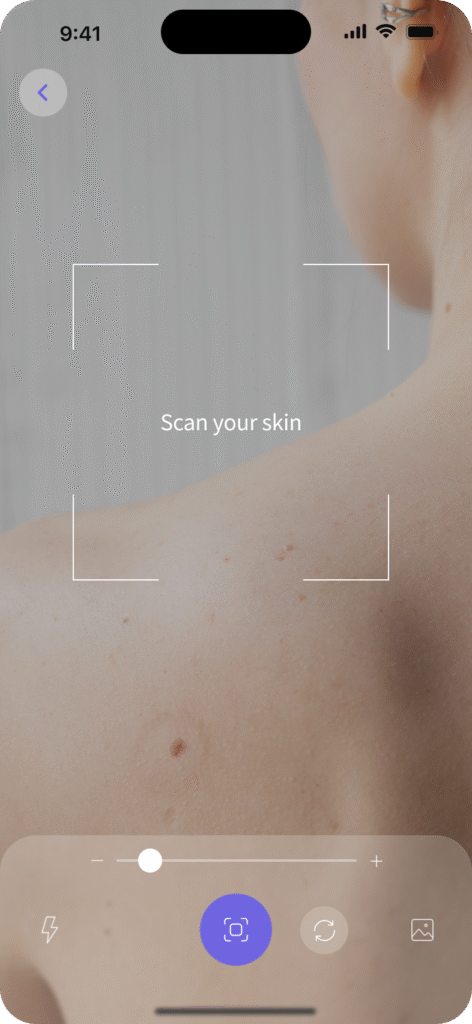
Fig.4
After a successful shooting with the camera, the application will verify that the captured image is of sufficient quality.
In case of unsatisfactory image quality, you will need to take a new photo of the same skin object (Fig. 5). If there is no network connection or there are problems with it, you will see the screen as Fig. 6. Check the network connection and repeat the skin test.
Recommended Conditions of Use:
- Use the app in bright, natural daylight for optimal image quality.
- Avoid extreme temperatures and high humidity (>90%), which may affect device performance.
In case of an error or if the app returns an unexpected result:
- Retake the test after 24 hours.
- If the issue persists, consult a healthcare professional.
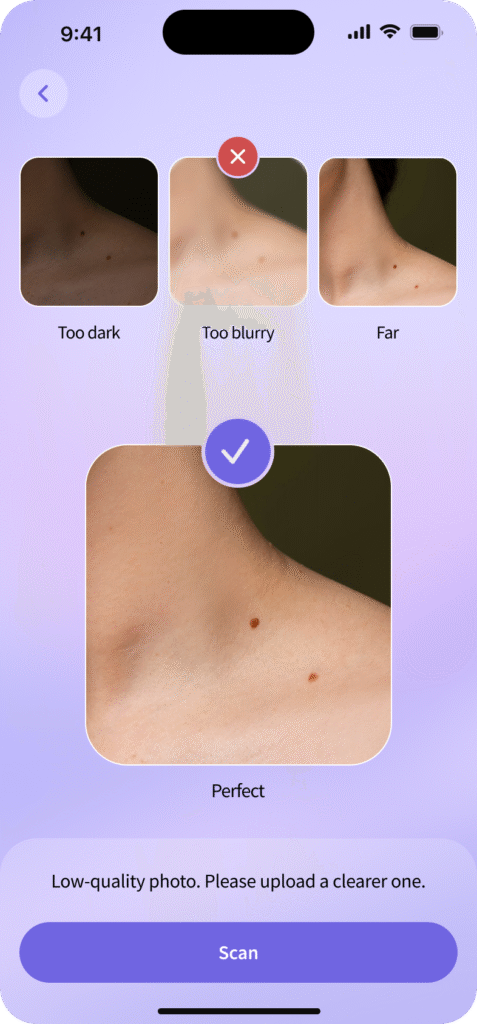
Fig.5
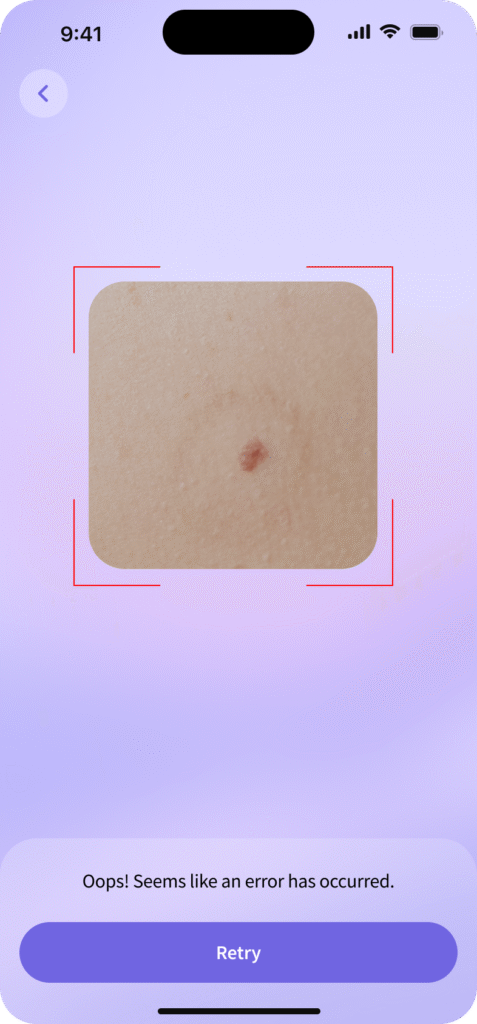
Fig.6
If the image quality is satisfactory, it will be transmitted to the server for evaluation.
The algorithm evaluates similarities based on visual features (Fig. 7). Upon completion, you will be directed to the results card screen, which stores the image and metadata (Fig. 8).
If the risk level is High, consult a medical professional, as the application may not accurately identify the condition.
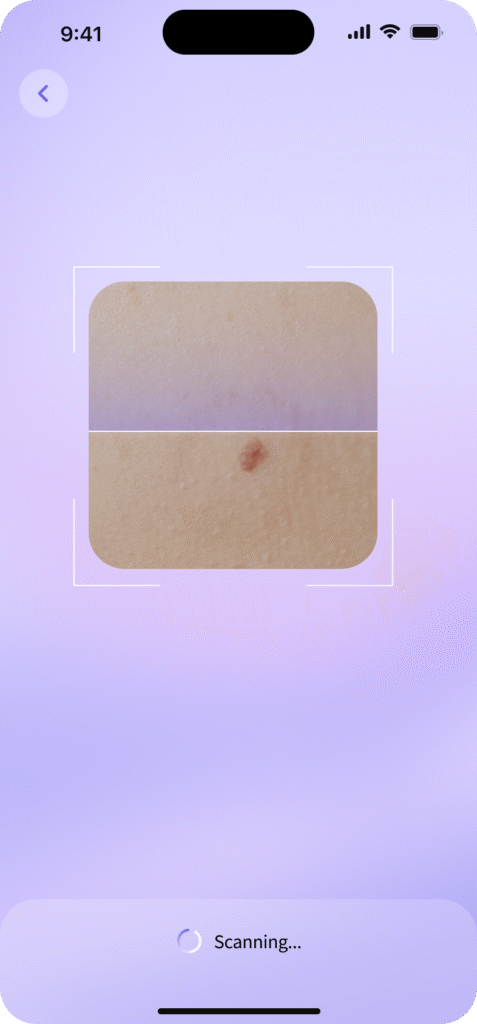
Fig.7
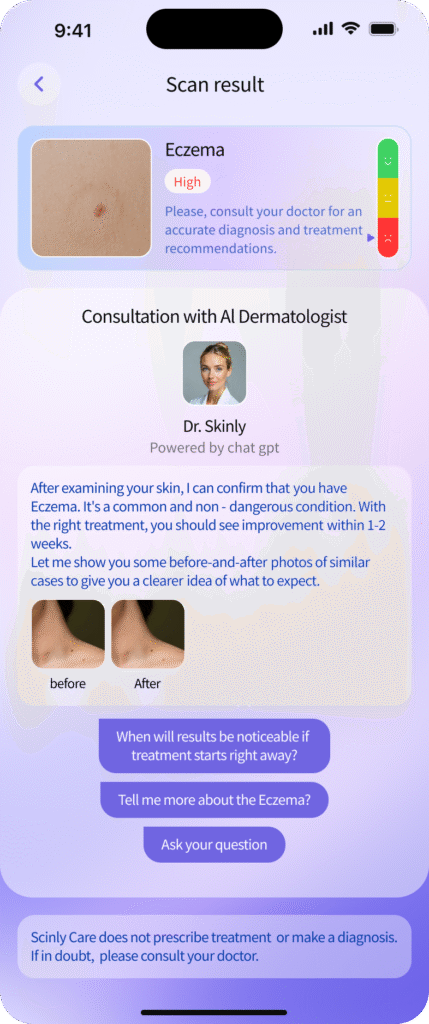
Fig.8
After receiving the result, you get the opportunity to save the image in your account and delete it. Access to the result in history can be obtained from the main screen of the application.
All results produced by the application, including final recommendations, are used for informational purposes only. You should not draw any conclusions or make a diagnosis based solely on the results of the assessment.
5. SAFETY WARNINGS & RISK MANAGEMENT
5.1 General Warnings
- SkinAI is NOT a diagnostic tool!
- Do NOT use the app for urgent or life-threatening conditions.
- Always consult a doctor for medical concerns.
5.2 Risk Management (ISO 14971)
Risk Factors:
- Poor image quality (low light, blurry images) may affect analysis.
- Network failures may prevent image upload or analysis.
- Users may misinterpret results without professional guidance.
- The app should not be used by children without adult supervision.
Mitigation:
- Users receive real-time on-screen alerts in case of poor image quality.
- Clear instructions on recognising critical skin conditions that require immediate medical attention are provided within the app. Critical skin conditions include rapidly changing lesions, asymmetry, irregular borders, pain or bleeding. Seek immediate medical attention if these are observed.
- If an error occurs, users are advised to retake the test in 24 hours to allow for changes in lighting or skin condition that may improve image quality, or consult a healthcare professional.
- POST-MARKET SURVEILLANCE (PMS) & INCIDENT REPORTING
PMS Plan:
- User complaints and feedback can be submitted via Support@skinlycare.io.
- Error data is analysed for continuous improvement.
- Users will be notified of updates and bug fixes via email or push notifications.
- Users will be notified via email or in-app alerts when the support period nears its end or if updates are required to maintain functionality.
How to report an incident:
- Contact Rodan mobile Kft (Email: Support@skinlycare.io)
- Report to the local Competent Authority (Ministry of Health or notified body).
Notification Period for Serious Incidents:
- Serious adverse events must be reported within 10 days.
- For minor issues (e.g., app crashes), report to Support@skinlycare.io for assistance. Serious incidents affecting health must be reported within 10 days.
7. WARRANTY, LIABILITY & LEGAL NOTICES
Manufacturer Contact Information:
Rodan mobile Kft.
Hungary, 2161 Csomád, Verebeshegy utca 11
Tel.: +3617010727
Email: Support@skinlycare.io
Complies with the requirements of ISO 14971.
For warranty terms and legal disclaimers, visit www.skinlycare.io.
